Turn images, photos, and pictures into PDFs in seconds. Combine multiple JPGs into one PDF, put them in order, and set the page size, orientation, and margins.
Upload your JPGs, PNGs, or iPhone photos, set up your pages the way you want, convert your images from any device, and get a sharp, high-quality PDF.
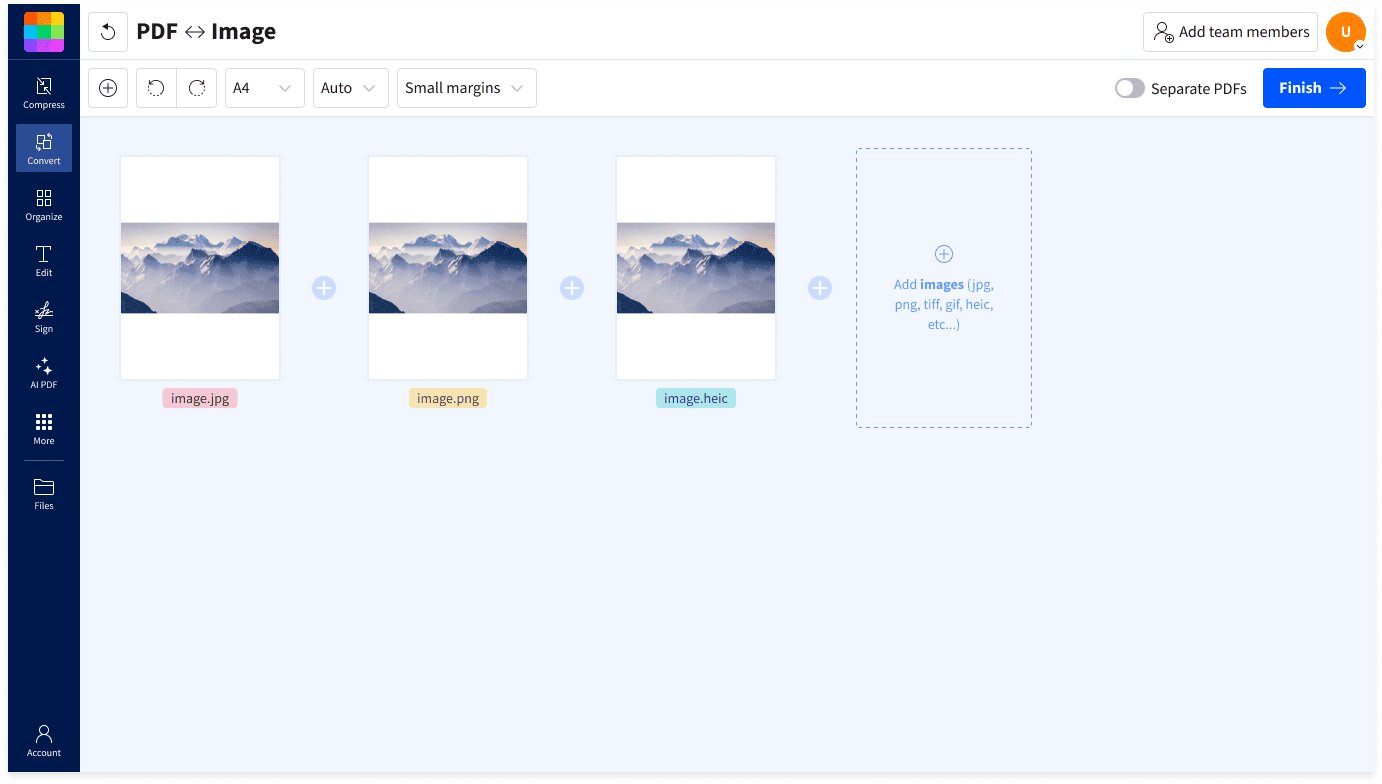
Add all your pictures and images, drag them into the right order, and rotate or remove any image before you convert. Then set the page size (A4 or US Letter), orientation, and margins. Merge everything into one multi-page PDF, or create a separate PDF for each image.
Upload JPG, JPEG, PNG, HEIC, WebP, GIF, BMP, or TIFF files, and mix and match formats in one upload, like iPhone photos and screenshots. The converter runs online in any browser on Mac, Windows, Linux, iOS, and Android, with nothing to install.

The JPG to PDF combiner keeps the original resolution of your images, so each page is as sharp and clear as the photo you started with. Your PDF looks right on screen and in print, whether it holds family photos, a portfolio, or a scanned document.

Turn photos and images into PDFs for free with no installation, email address, or account creation required. Drop in your images and download a PDF with no watermark.

Our PDF maker converts JPEGs and other images right in your browser. Create the PDF you need and download it right away or share it with a link.

Your PDF will open in any PDF reader or web browser, so you can email it or upload it to a form without compatibility issues.

Take a photo of a receipt, form, or ID and convert it to a PDF page. Pick A4 or US Letter so it prints and uploads like a scanned document.

Check every page in the preview before you convert, and zoom in on details to make sure each image looks right. Add more images at any point.

Your photos and images stay protected with TLS encryption. Smallpdf is GDPR compliant and ISO/IEC 27001 certified, and automatically deletes files one hour after conversion.
Yes, you can convert JPG to PDF for free with Smallpdf. You can convert a limited number of images to PDFs per day without creating an account or providing an email address.
Upgrade to a Pro plan for unlimited image conversion, access to advanced features, and 50+ other PDF tools.
You should convert a JPG to PDF if you want your images in a format that's easier to share, print, and submit. Many job portals, schools, and government sites only accept documents as PDF files.
A PDF can also hold several images as pages in one file, and in the order you choose.
Yes, you can convert JPG to PDF without losing quality. Smallpdf's JPG to PDF converter keeps the original resolution of your images, so the PDF looks like the photos you started with.
The PDF can only be as sharp as the original image, so a blurry or low-resolution photo will look the same in the PDF.
You can convert JPG and JPEG images to PDF with Smallpdf, along with PNG, HEIC, WebP, GIF, BMP, TIFF, and more. All of these file types convert to high-quality PDFs.
Smallpdf can also convert Word documents (DOC, DOCX), Excel spreadsheets (XLS, XLSX), PowerPoint presentations (PPT, PPTX), and other document types to PDF.
Yes, your data is secure when you convert JPG to PDF. Your files are protected with TLS encryption, and Smallpdf is GDPR compliant and ISO/IEC 27001 certified.
Your images and photos are automatically deleted from Smallpdf's servers after one hour of processing by default (unless you choose to save them to your Smallpdf account).
Yes, you can merge multiple JPGs and other images into one PDF. Add all your images to the JPG to PDF converter, drag them into the order you want, and convert them into a single PDF with one image per page.
You can mix formats in the same PDF, such as JPGs, PNG screenshots, and HEIC photos from an iPhone. If you'd rather have a separate PDF for each image, choose that option before you convert.
Yes, JPEG and JPG are the same image format with different file extensions. Older versions of Windows only allowed three-letter extensions, so ".jpeg" was shortened to ".jpg", and both names are still used today.
Smallpdf's converter works as a JPEG to PDF converter too, so you can upload .jpg and .jpeg files together and convert them into one PDF.
Yes, you can convert a screenshot to PDF with Smallpdf's JPG to PDF converter. Screenshots are usually saved as PNG files, which the converter supports along with JPG and other image formats.
Add several screenshots at once to combine them into one PDF, such as a receipt, a chat conversation, or a set of slides.

Free and simple online tool to change JPG images to PDF. No watermarks, registration nor installation needed.
Read article
Convert and compress your JPG to a PDF under 200 KB using Smallpdf. Upload from any device or cloud service, online, free, and without registering.
Read article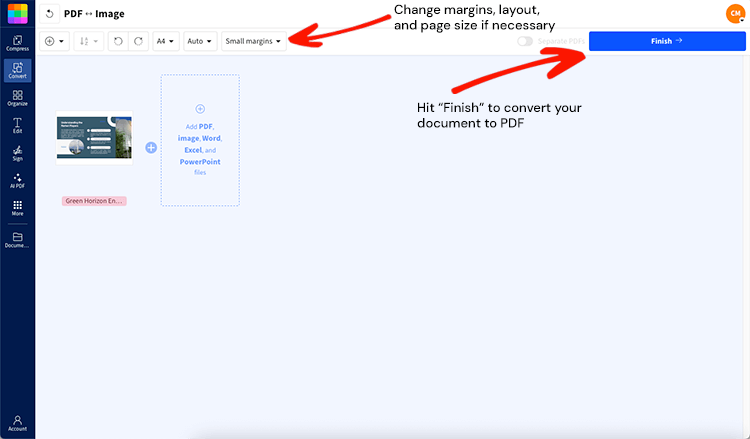
Free PDF Maker: upload Word, Excel, PowerPoint, or image files and instantly create high-quality PDFs, with no signup, no watermark, and no installation.
Read article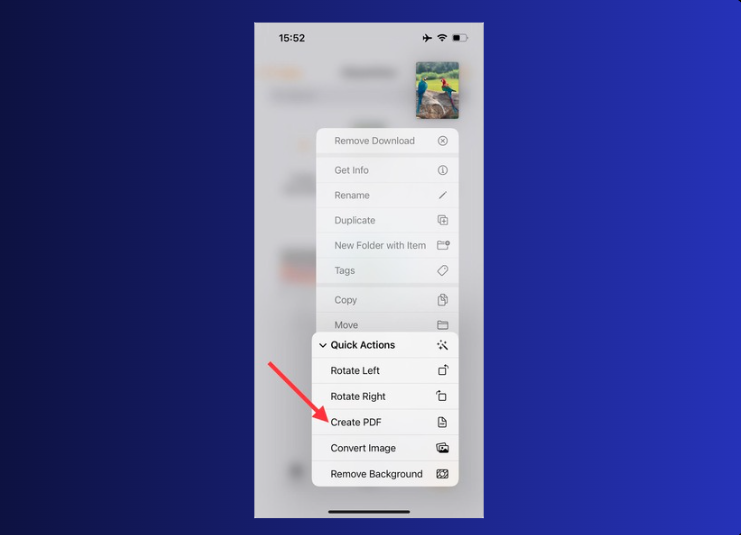
Need to save a picture as a PDF on your iPhone? Do it in seconds with built-in apps, the Smallpdf mobile app, or an online converter. Free and secure.
Read article
Convert any JPG to a PDF on your Android device using our free online tool. It's fast, simple, and you don't need to download an app.
Read article
Use the most proficient JPG to PDF converter to export your JPG images into high-quality PDF files. Free to use online, no account is required!
Read article